
CAD, records, and FiveM integration
PulseMDT
Set up your community, connect your FiveM server with one folder, and choose which features run.
Open PulseMDTSetting up your community
Do these in order the first time. Everything after signing in happens in Administration, and every step can be changed later.
Sign in
Open pulsemdt.com and sign in with your Pulse account, the same sign-in as every Pulse Systems product. PulseMDT reads your Discord identity and server list from it to match you to your communities. Nothing is posted for you.
Create your community
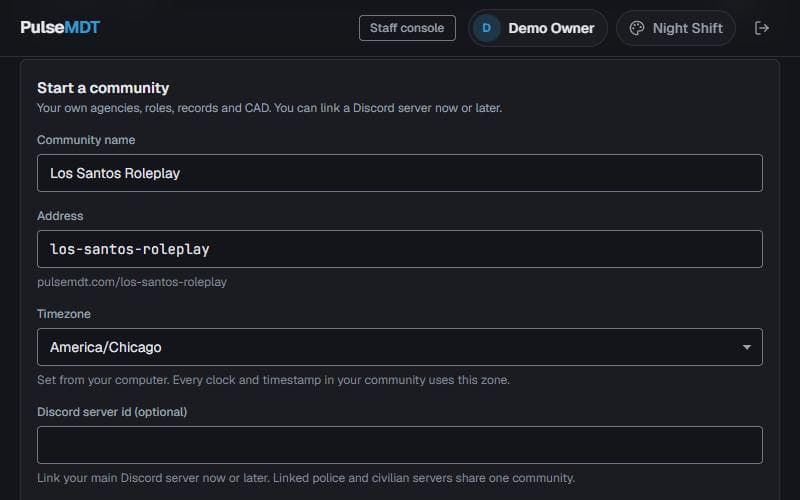
On the Communities page, fill in Start a community. The address is filled in from the name as you type. The timezone is taken from your computer: every clock, timestamp and yearly record number in the community uses it. Linking your Discord server id here is optional and can be done later. Moving from PulseMDT 1? Skip this step, your server was brought across for you (see Moving from PulseMDT 1).
Apply the starter pack
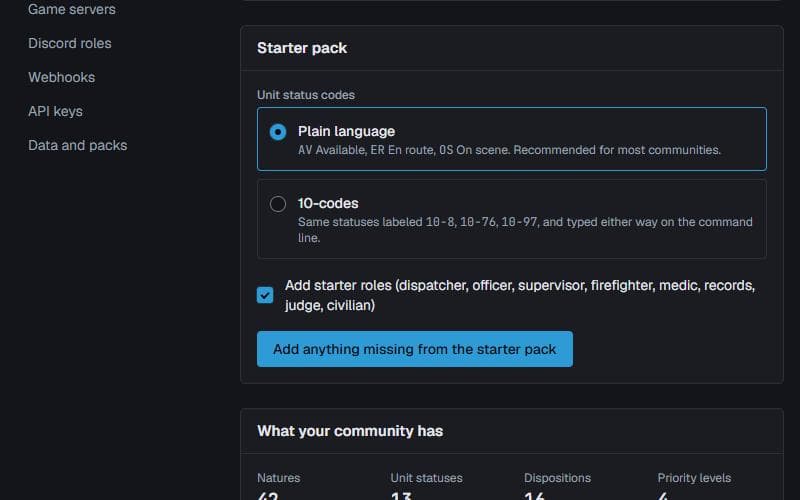
Administration > Setup. Pick plain-language statuses (Available, En route) or 10-codes, and keep the starter roles. This adds unit statuses, call natures, dispositions, priorities and roles in one go. The same page holds the community timezone.
Add your agencies
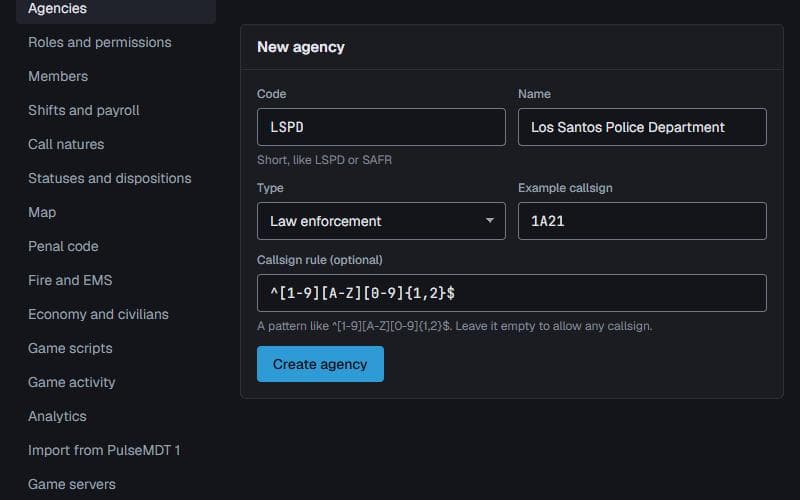
Administration > Agencies. Add each department: police, sheriff, fire, EMS, dispatch, courts or DOT. The short code you give one (like LSPD) is what officers type to go on duty in game. An optional callsign pattern and example make sign-on refuse callsigns that do not fit.
Check the roles
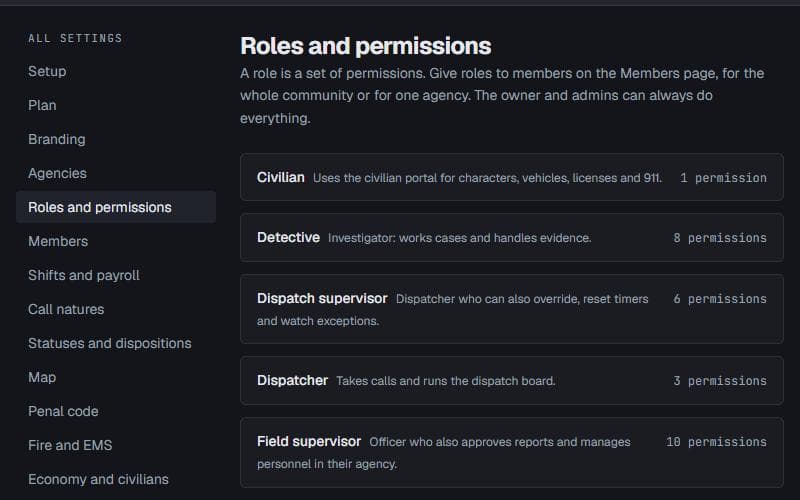
Administration > Roles and permissions. The starter roles (Officer, Dispatcher, Field supervisor, Medic, Judge, Civilian and more) decide what each person can see and do. Adjust them only if your community works differently.
Bring your members in
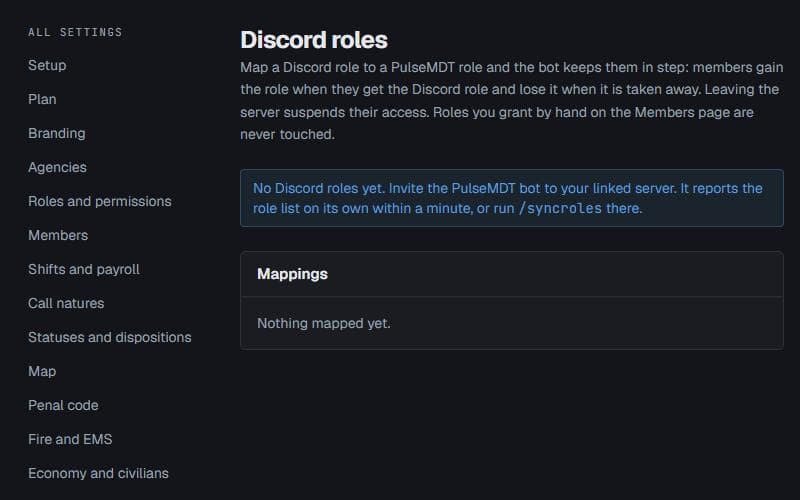
Administration > Discord roles: invite the PulseMDT bot to your Discord server, then map each Discord role to a PulseMDT role, for one agency or the whole community. People gain and lose access as their Discord roles change, and leaving the server suspends them. After changing a lot of roles at once, /syncroles in Discord (needs Manage Server) brings everyone up to date straight away.
Invite people outside Discord
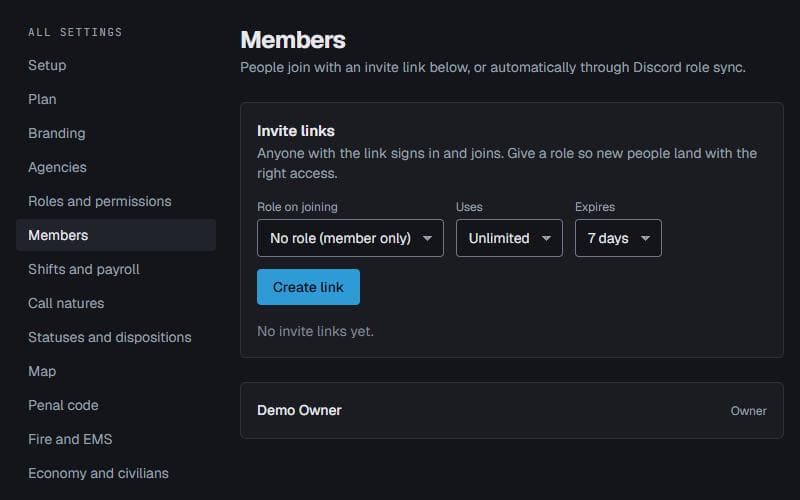
Administration > Members makes invite links. Pick the role new people get, how many times the link can be used and when it expires, then send the link. Anyone who opens it signs in and joins.
Connect your game server
Follow Installing on your FiveM server below. Without a game server the website still works as a full CAD and records system.
Choose a seat
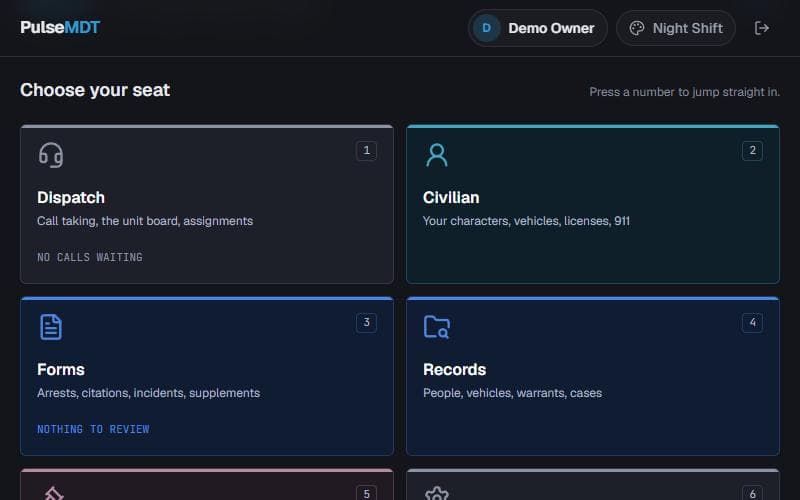
Everyone opens the community and picks a seat: Patrol, Fire and EMS, Dispatch, Civilian, Forms, Records, Courts or Administration. Number keys jump straight in, and a seat someone has no access to stays locked.
Installing on your FiveM server
PulseMDT ships as one folder, [pulse], holding the pulsemdt resource (the in-game tablet and connection) and every pulse_* script. You install it once and choose which features run from the website.
Download the game pack
Download pulse-game-pack.zip from github.com/PulseSystemsDev/pulsemdt-connector/releases/latest and extract it into your server's resources folder. It unzips to a folder named [pulse]. Keep every folder name as it is: FiveM uses the folder name as the resource name.
Create a server key
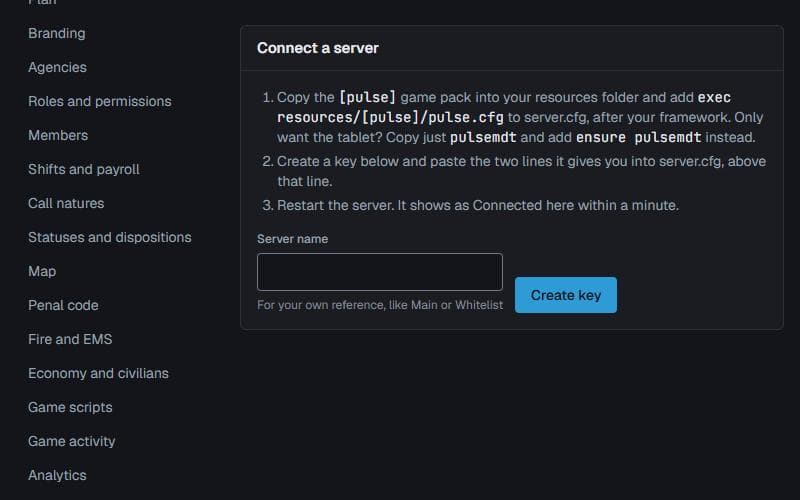
In the website, Administration > Game servers, create a key for this server. It shows the two lines below with your key filled in. Each game server gets its own key, and a key can be revoked there at any time.
Add three lines to server.cfg
Put them after your framework (QBCore, Qbox or ESX) if you run one. Always use set, never setr: setr would send your key to every player.
set pulsemdt_api_url "https://api.pulsemdt.com" set pulsemdt_server_key "pmdt_gs_..." exec resources/[pulse]/pulse.cfgRestart and check
Restart the server. Within a minute the server shows as Connected under Administration > Game servers.
Go on duty in game
Players join the community on the website with the same Discord account they play with. Then /duty LSPD 1A21 (agency code and callsign) signs them on, and F6 or /mdt opens the tablet.
Choosing which features run
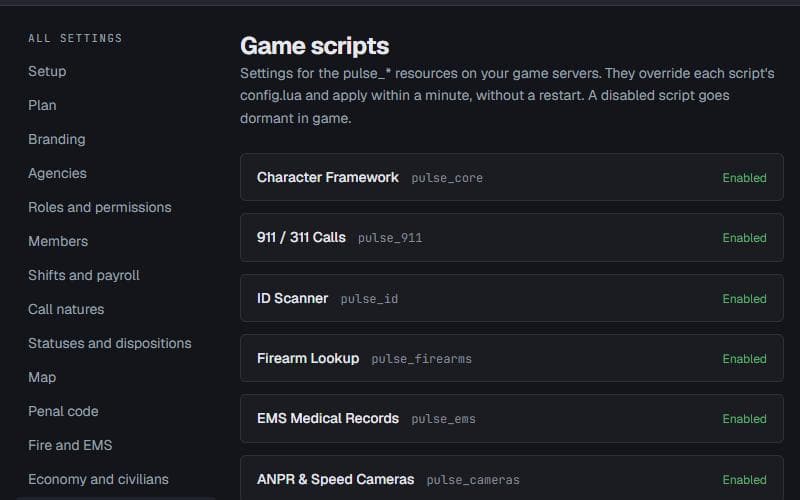
Administration > Game scripts lists every pulse_* script. Switch each one on or off and change its settings there. Changes reach your game servers within a minute, with no restart and no file editing. A script switched off stays loaded but does nothing.
Foundation
pulse_core (characters and money for servers without a framework), pulse_notify (on-screen alerts, always on), pulse_hub, pulse_dutystations and pulse_id.
Public safety
pulse_firearms, pulse_ems, pulse_cameras, pulse_radar, pulse_shotspotter, pulse_breathalyzer, pulse_impound, pulse_jailing and pulse_doorlocks.
Community systems
pulse_911, pulse_atm, pulse_jobs, pulse_fuel, pulse_casino and pulse_needs.
Vehicles and property
pulse_garage, pulse_dealership, pulse_vehiclekeys and pulse_property.
Changing a script's settings
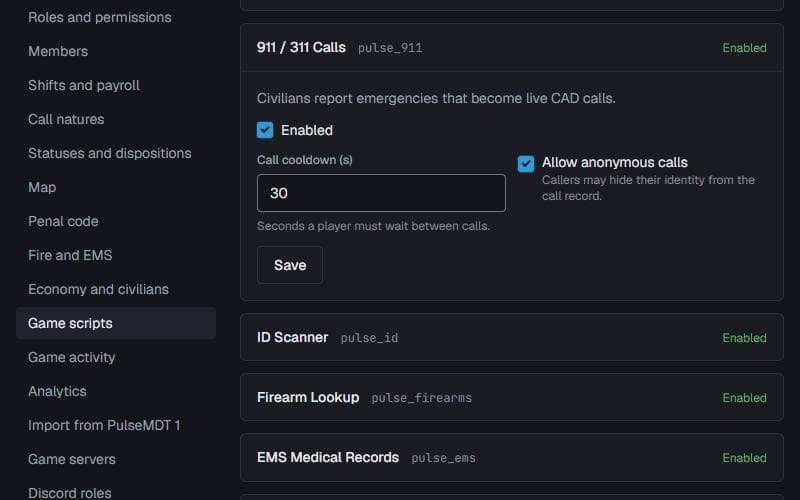
Click a script to open it. Its settings replace the values in that script's config.lua, so you can keep the files as they shipped. Save, and game servers pick the change up within a minute.
In-game commands
Commands and keys can be renamed or turned off in pulsemdt/config.lua. Players can rebind keys under Settings > Key Bindings > FiveM.
F6 or /mdt
Opens the tablet: waiting calls, your call with waypoint and notes, plate and name returns, 911 and panic.
/duty LSPD 1A21
Goes on duty with an agency code and callsign. The callsign can be left off when the member's profile has one. /offduty signs off.
/status OS
Changes unit status with your community's codes or 10-codes. F1 to F9 in the tablet do the same.
F7 or /panic
Emergency button. Every unit gets the alert and a map blip; press again to clear.
/911 what is happening
Anyone can call 911, on duty or not. The call lands on the dispatch board with the caller's location.
/plate and /person
/plate 8KLM441 runs a vehicle with the officer-safety banner; /person john smith runs a name ("smith, john" works too). Every lookup is logged in the read audit.
Resource configuration
pulsemdt/config.lua holds client options only. The connection lives in server.cfg so the key never reaches players.
Keys
Config.TabletKey (F6) and Config.PanicKey (F7). Config.QuickStatus adds keys for single statuses, for example { key = 'NUMPAD1', code = 'AV' }.
Commands
Config.Commands renames any command; set one to false to turn it off.
Postal codes
Config.PostalResource works with the common nearest-postal resource and puts postals on calls and unit positions. Set it to false if you do not run one.
Board updates
Config.StreetUpdateInterval sets how often (milliseconds) an on-duty player's street is refreshed on the dispatch board. 5000 is a good default.
Alerts
Config.UsePulseNotify uses pulse_notify for alerts when it is running. Config.PanicBlipSeconds sets how long a panic blip stays. set pulsemdt_notify_new_calls "false" in server.cfg stops new-call alerts to available units.
Radio
Config.Radio.enabled puts players on their agency channel when they sign on, and with incidentChannels on their call's channel. pma-voice works as is.
QBCore, Qbox and ESX
PulseMDT finds a running framework on its own. When a player loads a character there, the same character appears in PulseMDT, matched by citizen id and renamed when it changes, so plates and records line up with what is being played.
Choosing explicitly
set pulsemdt_framework "auto" in server.cfg. Use qbcore, qbox, esx, or none to switch the bridge off.
set pulsemdt_framework "auto"No framework
Leave it on auto and switch pulse_core on in Game scripts for characters and money.
For script developers
Other resources connect with one line each. Every pulse_* script from PulseMDT 1 keeps working: the 1.x exports (IsOnDuty, GetOfficer, HasCadJob, ApiRequest and the rest) answer from 2.0.
Plate readers
Any radar or camera script reports reads with exports.pulsemdt:ReportPlateRead(source, plate, 'Camera name'). Only hits (BOLO, stolen, owner warrant or caution, registration problems) reach the officer.
Callout and NPC 911 calls
exports.pulsemdt:ReportNpcCall({ message, address, postal, coords, natureCode }). Repeat reports of one scene within a few minutes become notes on one call.
Station alerting
AddEventHandler('pulsemdt:stationAlert', ...) fires when dispatch assigns an apparatus, with its callsign, the call and its location, for tones, lights or readerboards.
Web API and webhooks
Administration > API keys gives scoped, rate-limited keys to read the board, create calls and run lookups. Webhooks are signed with Pulse-Signature (HMAC-SHA256) and retried for about eight hours.
Moving from PulseMDT 1
When PulseMDT 2 went live, every Discord server the 1.x bot was in became a 2.0 community owned by its server owner, with linked police servers merged in and all data imported. There is nothing to run.
Check your import
Administration > Import from PulseMDT 1 shows when your data came across and what was brought over.
Set your timezone
PulseMDT 1 never stored one, so imported communities start on UTC. The first time you open the community you are offered your own zone in one click; it is also under Administration > Setup.
Replace the game resources
Swap your old pulsemdt and pulse_* folders for the [pulse] game pack. Your scripts keep working unchanged.
Switch to a server key
PulseMDT 2 ignores pulsemdt_api_key and pulsemdt_guild_id. Create a server key in Administration > Game servers and use the three lines from Installing on your FiveM server.
Tell your players
The tablet opens with F6 or /mdt, and players sign in on the website with their Pulse account.
Who uses what
Each seat is built for one job.
Dispatchers
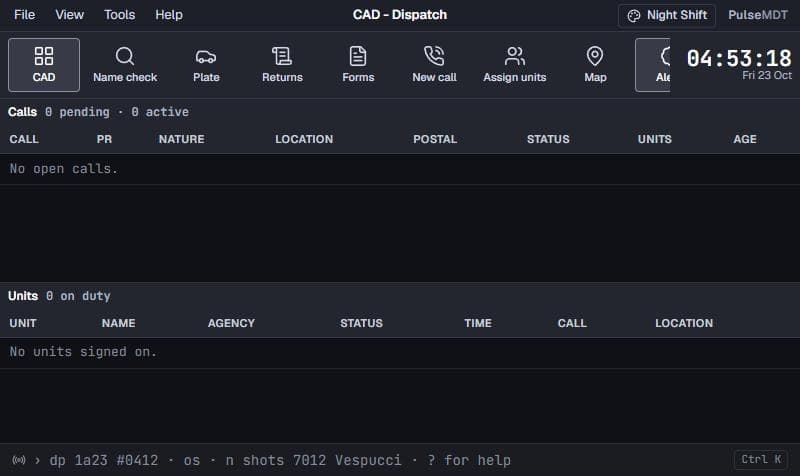
Console: the Line (Ctrl K) does it all by keyboard: N new call, DP dispatch, status codes, NC notes, CL close, PL, QN and QS lookups, ? for help.
Officers, fire and EMS
The console or the in-game tablet: sign on, status, queries, panic or Mayday.
Supervisors
Forms: claim reports, return them with comments, approve.
Detectives
Records > Cases and Evidence: case files, tasks, solvability and chain of custody.
Prosecutors and judges
Court: file charges, schedule hearings, dispositions, sentencing and expungements.
Civilians
Civilian: characters, vehicles, firearms, license applications and web 911.
Permissions and privacy
Access comes from PulseMDT roles, which your Discord roles grant.
Discord role sync
Members gain and lose access as their Discord roles change. Leaving the server suspends them.
Every lookup is logged
Records queries are logged with who, when and why. Sealed people need a reason to open, and that is logged too.
Medical records
Patient care reports are medical records: EMS, medical roles and reviewers only.
Nothing is deleted
Records are sealed or expunged, never deleted, and every change is in a tamper-evident audit log.
Troubleshooting
Check the connection and the member's account before assuming a permissions problem.
The server never shows Connected
Check both set lines are in server.cfg (set, not setr), the key was copied in full, and the server can make outbound HTTPS requests. Look for [PulseMDT] lines in the server console: red ones say what is wrong.
A player cannot open the tablet or go on duty
They must have joined the community on the website with the same Discord account they play with, and hold a role that allows the CAD.
/duty refuses a callsign
The agency has a callsign pattern. The example under Administration > Agencies shows what fits.
A script error at startup
Make sure the exec line is in server.cfg once, after your framework. The [pulse] folder starts pulsemdt before every script.
A setting change does nothing
Settings reach game servers within a minute. Check the script is switched on under Game scripts.
Times look hours off
Set your community timezone under Administration > Setup.